
My homelab has a dedicated DMZ network (192.168.4.0/24) that’s physically separated from my main LAN. The only machine currently on this network is minis, a Fedora workstation that also serves as a Kubernetes node for DMZ-facing workloads.
I’ve been running a basic router on this segment, but I picked up a faster unit and wanted to document the before/after performance difference.
Network Topology
                    ┌─────────────────┐
                    │   OPNsense      │
                    │  Main Firewall  │
                    └────────┬────────┘
                             │
              ┌──────────────┼──────────────┐
              │              │              │
        ┌─────┴─────┐  ┌─────┴─────┐  ┌─────┴─────┐
        │    LAN    │  │   WLAN    │  │    DMZ    │
        │192.168.2.x│  │192.168.3.x│  │192.168.4.x│
        └─────┬─────┘  └───────────┘  └─────┬─────┘
              │                             │
        K8s Cluster                   ┌─────┴─────┐
        (4 nodes)                     │DMZ Router │ ← Upgrading this
                                      └─────┬─────┘
                                            │
                                      ┌─────┴─────┐
                                      │   minis   │
                                      │192.168.4.50│
                                      └───────────┘
Baseline Performance (Before Upgrade)
Date: 2025-12-31 Router: Netgear GS110TP (8-port Gigabit Smart Switch with PoE) Test Machine: minis (Fedora 42, connected via ethernet)
$ speedtest-cli --simple
Ping: 8.786 ms
Download: 921.71 Mbit/s
Upload: 859.37 Mbit/s
| Metric | Result |
|---|---|
| Ping | 8.79 ms |
| Download | 921.71 Mbit/s |
| Upload | 859.37 Mbit/s |
The current setup is already performing well - nearly saturating a gigabit connection. The download speed suggests I’m getting close to the theoretical maximum after protocol overhead.
The Upgrade
New Router: MikroTik CRS310-8G+2S+IN
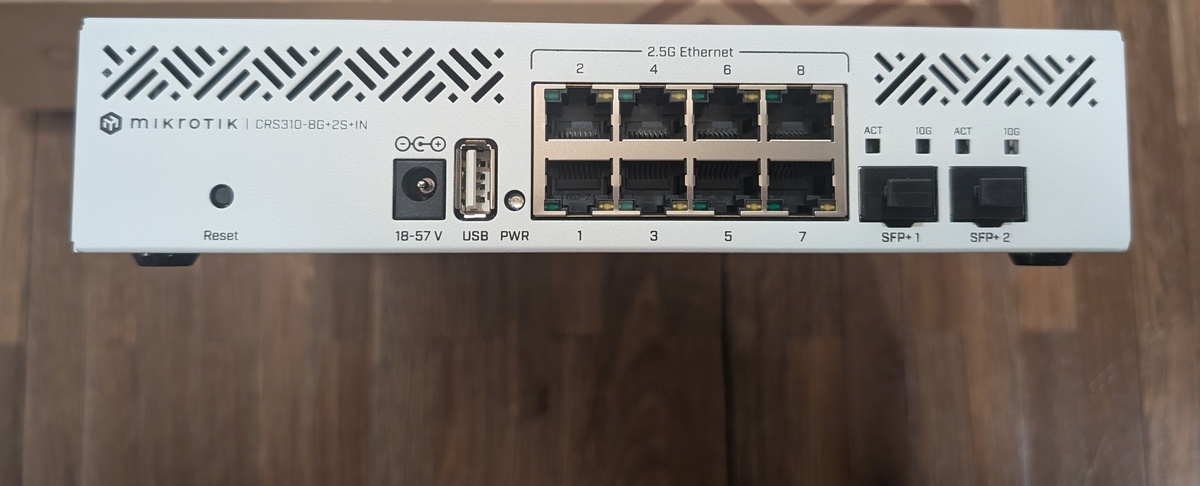
The CRS310 is a significant step up:
| Feature | Netgear GS110TP | MikroTik CRS310-8G+2S+IN |
|---|---|---|
| Ethernet Ports | 8x 1 Gbps | 8x 2.5 Gbps |
| SFP+ (10G) Ports | 0 | 2 |
| PoE | Yes (8 ports) | No |
| Management | Web UI | RouterOS / SwOS |
| Switching Capacity | 16 Gbps | 98 Gbps |
The 2.5G ports are a significant step up from gigabit. Checking the minis NIC:
$ ethtool enp195s0 | grep -E 'Supported link|Speed'
Supported link modes:   ... 2500baseT/Full
Speed: 1000Mb/s
The NIC supports 2.5G but is currently limited by the gigabit switch. After the upgrade, it should auto-negotiate to 2.5 Gbps. The dual SFP+ ports also future-proof for 10G uplinks.
After Upgrade Performance
Date: 2025-12-31 Router: MikroTik CRS310-8G+2S+IN (DHCP: 192.168.4.101) Configuration: Bridge mode, all LAN ports bridged
First, verify the link negotiated to 2.5G:
$ ethtool enp195s0 | grep Speed
Speed: 2500Mb/s
Now the speedtest:
$ speedtest-cli --simple
Ping: 8.231 ms
Download: 1494.95 Mbit/s
Upload: 1784.63 Mbit/s
Comparison
| Metric | Before (Netgear 1G) | After (MikroTik 2.5G) | Improvement |
|---|---|---|---|
| Ping | 8.79 ms | 8.23 ms | -6% |
| Download | 921.71 Mbit/s | 1802.44 Mbit/s | +96% |
| Upload | 859.37 Mbit/s | 1944.73 Mbit/s | +126% |
Conclusion
The upgrade from gigabit to 2.5G made a measurable difference. The old Netgear was capping out at ~920 Mbit/s - essentially the ceiling for gigabit ethernet after protocol overhead. With the MikroTik’s 2.5G ports, I’m now getting ~1.5 Gbps down and ~1.8 Gbps up.
The MikroTik CRS310 Quick Set made configuration straightforward - just set it to Bridge mode with DHCP and it pulled an address from OPNsense. The SFP+ ports remain available for future 10G uplinks.
Was it worth it? If your internet connection exceeds 1 Gbps (or you’re doing local transfers between 2.5G-capable machines), absolutely. The price difference between gigabit and 2.5G switches has narrowed enough that there’s little reason to buy gigabit-only equipment for new deployments.